The latest obsession taking over social media feeds is the "Spirit First Look" trend. This viral wave originates from the massive anticipation surrounding the upcoming Indian film Spirit, slated for release in 2026 and starring Pan-India superstar Prabhas. Following the release of its intense and gritty promotional material, fans and creators have started using AI to insert themselves into this high-octane cinematic universe. This article will guide you through mastering the spirit poster prompt, utilizing top AI tools like Google's Gemini and OpenAI's ChatGPT to recreate this specific viral aesthetic using your own photos.
How the Spirit First Look Trend Took Over Social Media
The Spirit first look prompt trend is a direct response to the hype surrounding Sandeep Reddy Vanga's directorial venture Spirit. Known for his raw and intense storytelling, Vanga's collaboration with Prabhas has generated immense buzz. When the initial First Look and poster concepts circulated online, featuring gritty texture, dramatic lighting, and a dark, rebellious tone, netizens immediately sought to replicate that specific Main Character energy.

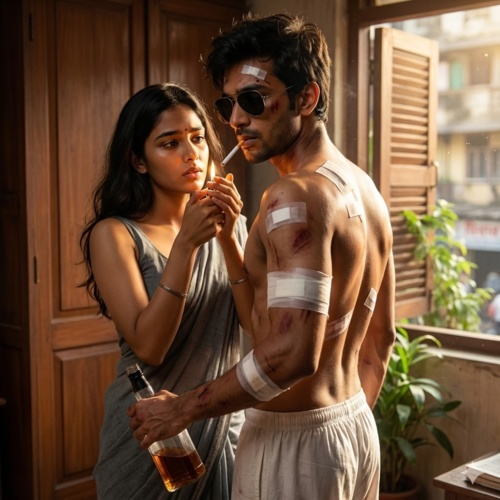
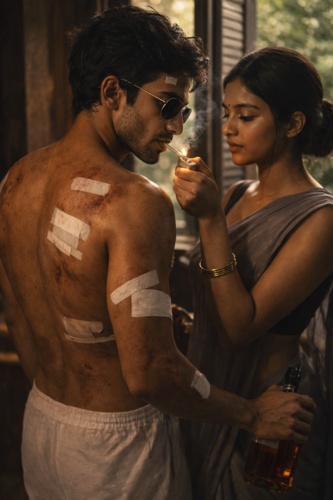
The trend involves users taking their own photos and using AI to transform them into the movie's signature style, often featuring rugged protagonists, bandages indicating battle scars, aviator sunglasses, and an atmosphere of brooding intensity. The hashtag #SpiritFirstLook has become a digital casting call where fans reimagine themselves as the lead in this 2026 blockbuster.
Using Gemini to Generate Your Spirit Movie Poster
Google's Gemini is a powerful tool for this trend, especially given its multimodal capabilities, which allow you to upload reference images. Here is how to generate your poster:
-
Step 1: Prepare Your Photos
Select a clear photo of yourself (and a partner, if using the couple prompt) that matches the angle described in the prompt.
-
Step 2: Upload to Gemini
Open Google Gemini. Look for the "Upload Image" icon (usually a plus sign or image icon) in the chat bar. Upload your reference photo(s).
-
Step 3: Enter the Prompt
Copy and paste the prompt below into the chat box along with your uploaded image.
 Prompt:
Use boys and girl same face as uploaded in refference image keep real face unchanged) A cinematic, ultra-realistic, intense Bollywood-style scene featuring a 25-year-old slim-fit Indian boy (reference- uploaded photo) with a sharp jawline, fair to wheatish skin tone, and a perfectly trimmed beard. He is shirtless, standing slightly turned away from the camera, showing his lean, toned back and shoulders, with visible muscle definition but a slim-fit physique, wearing a white pyjama and a teardrop-shaped lenses dark-black aviator sunglasses. Multiple white medical bandages are placed on his upper back, shoulder blade, lower back, and right arm, showing signs of recent injuries. His skin shows subtle bruises, scars, and raw texture, giving a gritty, realistic feel. Holding a whiskey bottle in right hand.
The boy has medium-length wavy hair, slightly messy and rugged. A small white bandage mark is placed on his forehead. His expression is calm yet intense, eyes lowered with controlled emotion. Behind him stands a young Indian woman (reference- uploaded photo), close and intimate, wearing a soft grey sleeveless sari, minimal makeup, tied hair, and gold bangles. She is gently lighting a cigarette near the boy's lips using a lighter, her face calm, focused, and emotionally connected. The scene is set inside a wooden room with open window shutters, allowing natural daylight to enter. Outside the window, green plants and soft urban background are visible. Warm sunlight highlights
Color grading is warm, cinematic, dramatic, with high contrast and ultra-sharp focus. Depth of field is shallow, background softly blurred. Skin texture, sweat, fabric fibers, smoke, and light reflections are extremely realistic.
Camera angle is medium close-up from behind, slightly side-angled, capturing both characters clearly. Mood is intense, emotional, raw, romantic, and powerful, like a high-budget Bollywood movie poster.
Ultra-photorealistic, 8K quality, HDR, sharp focus, cinematic lighting, professional color grading, film poster look.
-
Step 4: Generate and Refine
Hit enter. Gemini will analyze your photo and the text to generate the image.

Using ChatGPT to Generate Your Spirit Movie Poster
ChatGPT now automatically applies its newest image generation model (GPT Image 1.5), offering superior photorealism and facial consistency.
-
Step 1: Start the Chat
Open a new conversation. The system will automatically utilize the newest image model to handle complex textures and lighting, requiring no manual setup.
-
Step 2: Upload Reference
Click the attachment icon and upload your reference photo(s). This allows the model to accurately map your facial features onto the character.
-
Step 3: Input the Command
Copy and paste the exact prompt from the "Using Gemini" section above. We use the identical instruction here to ensure you can replicate the specific "Spirit" aesthetic, including the gritty texture and cinematic lighting.
-
Step 4: Generate the Poster
Hit send. The AI will process your photo and text to generate the final image. Once complete, you can save the high-resolution poster directly to your device.

Visualize Your Concepts Effortlessly with Diagrimo

Diagrimo turns complex ideas into clear, professional visuals in just a few clicks. Powered by AI, it enables text-to-visual transformation, helping you write smarter, think more clearly, and instantly convert text into structured diagrams. Whether you're planning strategies, explaining processes, or organizing knowledge, Diagrimo bridges the gap between words and visuals---so your ideas are easier to understand, share, and act on.

Key Features
Final thoughts
The Spirit First Look trend shows how AI has transformed fans from passive viewers into active creators, allowing anyone to step into a cinematic universe with nothing more than a photo and the right prompt. Beyond entertainment, tools like Diagrimo are also worth exploring for everyday work, as they help turn complex ideas into clear visuals and structured thinking.

- AI text-to-visuals turns ideas into diagrams or infographics.
- Customizable styles match your brand and presentation tone.
- Share anytime by exporting in various formats and a link.
- No design skills needed for presentations, teaching, or reports.

FAQs
-
Do I need design skills to create a Spirit First Look poster?
-
How does Diagrimo help with AI poster creation?
-
Can I use these posters for social media content?
-
Can AI perfectly copy my face into the poster?
No. With well-written prompts and AI tools, beginners can achieve professional-looking results.
Diagrimo helps you organize ideas, visualize prompt logic, and plan creative structure before generating images.
Yes. Spirit-style posters are especially popular on Instagram, YouTube, and X.
AI tools strive to maintain facial features when provided with a reference photo. However, the likeness is often stylized to match the dramatic lighting and mood of the poster, so it may not be a 100% exact replica.
