Struggling to bridge the gap between brainstorming with AI and actually finishing your document? You are not alone. OpenAI Prism has arrived to close that loop, offering a workspace where AI doesn't just chat---it co-authors. In this guide, we will break down exactly what this new tool is, identify who stands to benefit the most, and walk you through a simple, step-by-step tutorial to help you master OpenAI Prism in minutes. Let's dive in!
What Is OpenAI Prism?
OpenAI Prism is a newly launched, cloud based research workspace that integrates GPT-5.2 directly into a professional LaTeX editor. Designed to replace disjointed workflows, it allows users to draft, format, and cite complex academic papers entirely in the browser without managing local software. Unlike a standard chatbot, Prism is "context aware." It understands your entire document structure, turning natural language commands into perfect LaTeX code, handling everything from bibliography management to real time collaboration in one unified interface.

Who Can Benefit from OpenAI Prism Most?
While anyone can use this tool to draft a document, it is a true game changer for professionals who deal with strict formatting rules and complex structures. Here are the specific groups that stand to gain the most from this AI powered workspace.
- Academic Researchers
Automate the tedious parts of publishing, such as formatting, bibliography management, and error checking, to focus purely on discovery.
- University Students (PhD & Undergrad)
Get a 24/7 AI supervisor for your thesis that offers structural feedback, logic checks, and instant adherence to strict formatting guidelines.
- Technical Writers & Engineers
Effortlessly generate complex tables, convert whiteboard sketches to equations, and maintain consistency across massive technical reports.
- Non-Native English Speakers
Instantly elevate your writing to native level professional standards with tone polishing tools designed specifically for academic prose.
How Beginners Can Use OpenAI Prism Quickly and Easily
Prism eliminates the steep learning curve of LaTeX by allowing you to build complex scientific documents using natural language. Follow this step-by-step guide to go from a blank page to a professional research paper in minutes.
Step 1: Project Creation & Interface Familiarization
Log in to prism.openai.com (or crixet.com) and click the "New" button in the top right corner to start a fresh project.

-
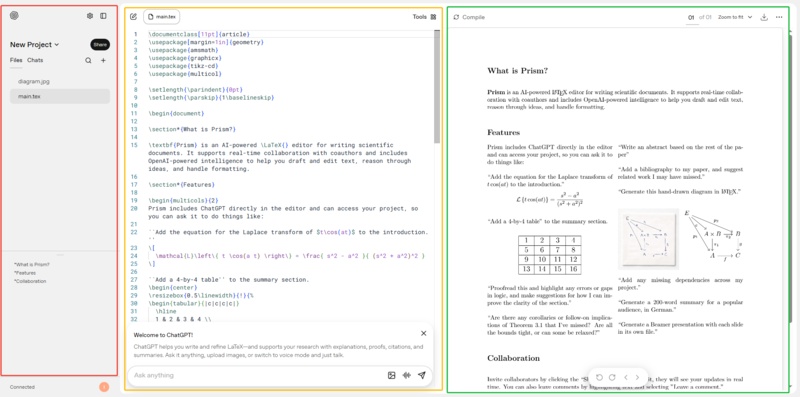
Left Panel: Your File Repository (where you manage project files, upload images, and store references).
-
Center Panel: Your Editor/Writing Area (the main.tex file---the AI writes the code here, you just focus on the content).
-
Right Panel: Live Preview (click Compile to see the generated PDF instantly).

Step 2: Prepare a "Clean Slate" & Generate Structure
When you create a new project, Prism often loads a template with pre-existing demo text in the center panel.
Action: Before you start generating new content, highlight all the existing code in the main.tex editor and delete it (or ask the AI to "Clear the file"). This ensures the AI generates a fresh document structure based specifically on your prompt without conflicts.

Create a document structure for a paper titled "Solid-State Electrolytes in Lithium-Ion Batteries". Write an abstract highlighting safety, energy density, and applications in electric vehicles.
Action: Click "Keep all" to accept the code, then hit the Compile button (top right). You will see your formatted title and abstract appear instantly in the preview pane.

Step 3: Insert Images (The AI-Assisted Way)
In traditional LaTeX, adding images requires specific code packages. In Prism, you can simply ask for the code.
-
Upload: Add an image (e.g., a diagram of a battery structure) into the Left Panel. Let's assume you named the file battery structure.jpg.
-
Ask: In the "Ask anything" box, type: "How do I add an image here?"
-
Insert & Edit: Prism will provide the code (including
\includegraphics{graphicx}). -
Crucial Detail: The AI will usually put a placeholder name in the code (like
myimage.png). You must manually change that text in the editor to match your uploaded filename (e.g., change filename tobattery structure.jpg). -
Compile: Hit Compile to see the image perfectly positioned with a caption.

Step 4: Format Complex Equations Instantly
-
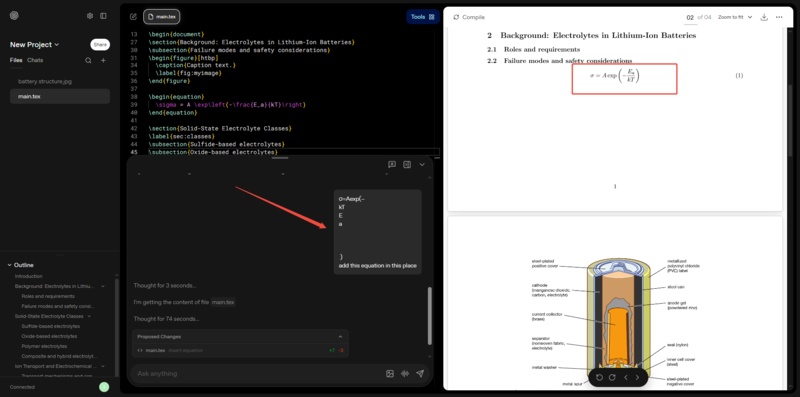
Recognition and Conversion: Users can copy messy text formulas (the Arrhenius equation in the demo), and the AI will automatically recognize, clean up the formatting, and convert it into a perfect LaTeX mathematical formula.
-
Handwriting recognition: Supports converting handwritten formulas or formulas from whiteboards directly into LaTeX code.

Step 5: Automate Data Research and Tables
Prism can browse the web to find data and format it into a complex table automatically.
Summarize findings from recent studies and create a table comparing common Lithium-ion battery recycling methods (Pyrometallurgy vs. Hydrometallurgy). Include columns for "Core Idea", "Advantages", and "Limitations".
Action: Prism will generate the complex \begin{tabular} code. Click
Compile to render a professional scientific table without typing a single
line of border or alignment code.
Step 6: Finalize with Citations
To finish your draft, ask Prism to handle the bibliography.
Add citations for the battery recycling methods mentioned above and generate a Reference section at the end of the document.
Action: The AI will insert \bibliographystyle and relevant .bib
entries, completing your paper with standard academic referencing.
Other Interface Details
-
Toolbar: Includes chat, file management, chart tools, and more.
-
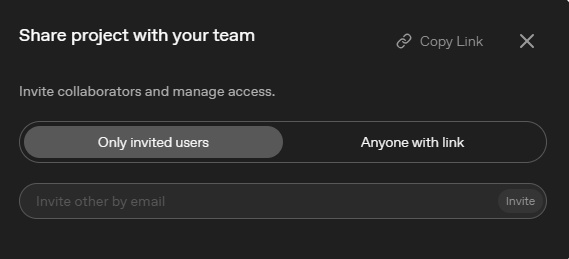
Sharing and Exporting: Supports generating links or inviting others to collaborate via email; supports one-click download of the final generated PDF file.
-
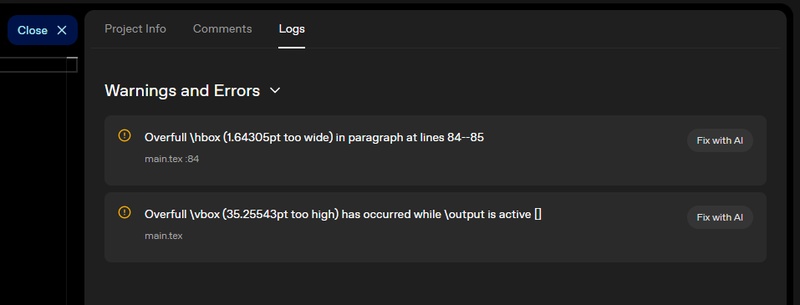
Logs and Comments: The right side of the interface has a dedicated
area to view compilation logs and collaborator comments.


Visualize Prism Outputs More Clearly with Diagrimo

Prism helps you write the complex logic, but Diagrimo helps you see it. When you have a dense explanation or a complicated process generated by Prism, you can simply paste that text into Diagrimo to instantly transform it into a clear, visual flowchart or mind map.

Why pairing Diagrimo with Prism works so well:
- Instant Clarity:
Turn a 500-word explanation of a process into a single, easy-to-understand flowchart in seconds.
- Editability:
Unlike the static code-generated diagrams inside LaTeX, Diagrimo's visuals are drag-and-drop. You can tweak the layout intuitively without touching a line of code.
- Presentation Ready:
Use Prism to write the report, then use Diagrimo to create the slide visuals for your presentation. It bridges the gap between "hard data" and "human understanding."
Final thoughts
OpenAI Prism represents a massive shift from "formatting documents" to simply "writing ideas." By handling the technical barrier of LaTeX and the organizational chaos of research, it frees you to focus on what actually matters---your content. Whether you are writing your first college paper or your tenth journal article, the key is to start small. Use the steps above, try the new features, and don't forget to visualize your logic with Diagrimo to give your readers the complete picture. Happy writing!

- AI text-to-visuals turns ideas into diagrams or infographics.
- Customizable styles match your brand and presentation tone.
- Share anytime by exporting in various formats and a link.
- No design skills needed for presentations, teaching, or reports.

FAQs
Is OpenAI Prism free?
Do I need to know LaTeX to use it?
Can I collaborate with others?
How is this different from ChatGPT?
Yes, the core features are free for anyone with a ChatGPT account, though advanced computation, like processing very large datasets, may require a Plus subscription.
Not at all. Prism allows you to build documents using natural language, such as "Add a table comparing X and Y," and it writes the code for you.
Yes, Prism supports real time multiplayer editing, allowing co-authors to comment and write in the same document simultaneously.
ChatGPT is a chat interface while Prism is a dedicated document editor. It compiles real PDFs, manages citations, and sees your whole file at once, whereas ChatGPT works in short conversation bursts.
