Breathing new life into vintage or damaged photos often depends on choosing the right old photo restoration prompt which guides AI to rebuild clarity, correct age related flaws, and brighten details that were once lost. But uncovering the best old photo to new photo AI prompt is not always straightforward, especially when different tools deliver different levels of enhancement. In this guide, you will explore which restoration tools perform well, how old to new transformation works, and you will also find 12 powerful prompts crafted to help you restore and modernize photos with impressive results.
- 1. Ultra-Realistic 8K Vintage Photo Revival
- 2. Canon-Level Professional Portrait Upgrade
- 3. Modern Digital Portrait Conversion (99% Likeness)
- 4. High-Quality Damage Repair and Natural Restoration
- 5. Authentic Vintage Transformation With 99% Likeness
- 7. Professional Canon EOS R5 Portrait Enhancement
- 8. Modern Portrait Upgrade With New Outfit and Background
- 9. 1080×1920 Modern Aesthetic Photo Edit
- 10. Full Modern Portrait Conversion With 100% Likeness
- 11. Authentic Colorized Restoration With Accurate Details
- 12. DSLR-Quality Family Photo Restoration (Canon R5 Look)
Which AI Tool Works Best for Old Photo Restoration
In recent months, Google Gemini's image generation and editing model has seen notable improvements, enhancing its ability to understand visual content and interpret detailed written instructions. These updates make it more effective at processing a Gemini prompt for old photo restoration, allowing the model to follow requests such as removing scratches, brightening faces, and restoring faded colors with greater accuracy. When given a well crafted old photo restoration prompt, Gemini can produce clearer, more balanced results, repairing visual flaws and restoring natural color in a way that feels more refined than earlier AI tools.
How to Use Gemini to Restore Old Photos
-
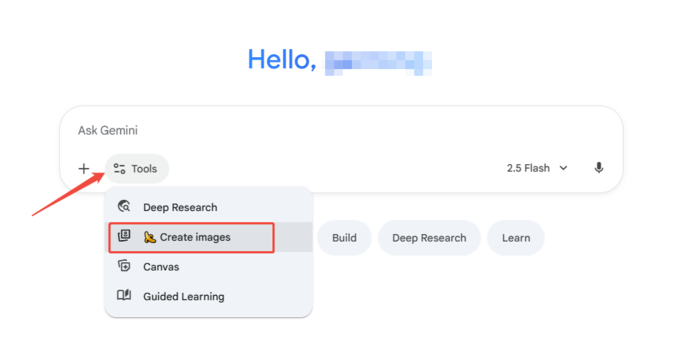
Step 1: Upload the old photo
Open Gemini, choose Create images option, and import the old or damaged photo you want to restore.
-
Step 2: Enter a clear restoration prompt
Type a detailed old photo restoration prompt describing what you want, such as improving clarity, removing scratches, restoring colors, or enhancing facial details.
-
Step 3: Generate and refine the result
Let Gemini process the image, review the restored version, and request small adjustments if needed to get a cleaner and more natural final photo.

12 Gemini Old Photo Restoration Prompt Free Samples to Try
Here are 12 Gemini old photo restoration prompts gathered from creators online, and you can freely adjust them to suit your own restoration needs.
1. Ultra-Realistic 8K Vintage Photo Revival


Create an ultra-realistic 8K restored version of an old, damaged photograph. The image should retain the original person's identity and features but be enhanced with lifelike skin texture, sharp facial details, and natural lighting. Remove scratches, stains, and blur while preserving authenticity. The colors should be soft, balanced, and natural, reviving faded tones into a rich, full-color look. Add depth, contrast, and gentle shadows to create a vibrant yet realistic restored portrait with DSLR-quality clarity and detail.
Source: @ShreyaYadav___
2. Canon-Level Professional Portrait Upgrade

Edit this photo into a professional portrait of very high quality and color, comparable to the results of Canon EOS R5. Create like a recent photo, with great clarity and no noise. Produce razor-sharp photos. Full HD 32k.
Source: @ShreyaYadav___
3. Modern Digital Portrait Conversion (99% Likeness)

Ultra-realistic recreation of an old vintage photo, keeping the same original face (99% likeness, no alteration). Transform into a modern high-quality digital portrait with vibrant updated colors, smooth realistic skin textures, and natural lighting.
Source: @runthistown5416
4. High-Quality Damage Repair and Natural Restoration

Restore this old damaged photo to high quality. Repair scratches, tears, and faded areas while keeping the face and details natural. Reconstruct missing parts with realistic texture. Enhance the skin tone to look original, smooth, and lifelike without over-editing. Balance colors to match natural lighting, sharpen facial features, and preserve authenticity. Output in photo-realistic style, high resolution.
Source: @ShreyaYadav___
5. Authentic Vintage Transformation With 99% Likeness

Ultra realistic recreation of an old vintage photo while keeping the same original face with 99 percent likeness and no alterations. Transform it into a modern high quality digital portrait with vibrant refreshed colors, smooth realistic skin textures, and natural lighting.
Source: @muratkarahaan
6. Canon-Style Portrait Restoration for Filipino Features

Restore and enhance this photograph to professional portrait quality comparable to a Canon EOS R5 capture. Repair all scratches, folds, stains, discoloration, and missing details with high-precision reconstruction while preserving the subject's natural Filipino facial features, skin texture, and lighting. Vivid Colourful.
Source: @ShreyaYadav___
7. Professional Canon EOS R5 Portrait Enhancement

Edit this photo into a professional portrait of very high quality and color, comparable to the results of Canon EOS R5. Create like a recent photo, with great clarity and no noise. Produce razor-sharp photos. Full HD 32k.
Source: @ShreyaYadav___
8. Modern Portrait Upgrade With New Outfit and Background

Ultra-realistic recreation of an old vintage photo, keeping the same original face (99% likeness, no alteration). Transform into a modern high-quality digital portrait with vibrant updated colors, smooth realistic skin textures, and natural lighting. The outfit and background should be upgraded into a clean, modern aesthetic while preserving the authenticity of the original pose and expression.
Source: @ShreyaYadav___
9. 1080×1920 Modern Aesthetic Photo Edit

Please edit my old photo into 1080 x 1920 pixels, with an aesthetic and modern photography look, making it appear authentic and enhancing the colors.
Source: @marryevan999
10. Full Modern Portrait Conversion With 100% Likeness

Ultra-realistic recreation of an old vintage photo, keeping the same original face (100% likeness, no alteration). Transform into a modern high-quality digital portrait with vibrant updated colors, smooth realistic skin textures, and natural lighting. The outfit and background should be upgraded into a clean, modern aesthetic while preserving the authenticity of the original pose and expression.
Source: @ShreyaYadav___
11. Authentic Colorized Restoration With Accurate Details

Restore this photograph to its original quality by repairing scratches and missing details. Then carefully colorize the image, keeping skin tones, clothing, objects, and background realistic. Preserve the original style without adding new elements or changing the identity of the people.
Source: @maviimarketing
12. DSLR-Quality Family Photo Restoration (Canon R5 Look)

Restore this vintage family photo to modern DSLR quality: fix scratches, bring back natural colors, sharp 4K detail, soft studio lighting, Canon R5 look, keep the emotion intact.
Source: @NickMeta_
Capture Your Ideas Visually Fast With Diagrimo

Diagrimo turns your text into clear visuals in seconds. Just type or paste your ideas, highlight the content, and let the AI analyze it to create the right diagram style. With its powerful text to diagram technology, Diagrimo instantly transforms processes, concepts, and project outlines into polished visuals. Whether you're mapping ideas or organizing information, you can convert text to diagram effortlessly and share results that look professional without any design work.
Why Users Love Diagrimo
-
Text to Diagram Generation: Instantly convert written content into flowcharts, mind maps, timelines, pyramids, and more.
-
Smart Layout and Style Detection: Diagrimo identifies the best diagram format based on your text and arranges everything neatly.
-
Built-in AI Writing Assistant: Improve, refine, or expand your text before visualizing it with one-click AI suggestions.
-
Simple Customization Tools: Adjust colors, shapes, fonts, and layout to match your preferred style.
-
Quick Export Options: Save your work as an image or a PDF for use in slides, reports, or sharing.
-
Organized Document Management: Create, favorite, and organize documents to keep projects structured.
Final thoughts
Restoring old photos with AI has become more accessible and accurate, especially with tools like Gemini that follow restoration prompts with precision. With the right old photo restoration prompt, you can revive vintage images, enhance facial details, and transform aged photos into clean, modern portraits. The steps and prompts in this guide help you achieve polished results whether you're repairing family memories or improving historical images. And for visual organization, Diagrimo makes it easy to turn written ideas into clear diagrams, completing your creative workflow.

- AI text-to-visuals turns ideas into diagrams or infographics.
- Customizable styles match your brand and presentation tone.
- Share anytime by exporting in various formats and a link.
- No design skills needed for presentations, teaching, or reports.

FAQs
What is an old photo restoration AI prompt?
-
Can Gemini really turn an old photo into a new one?
-
Do I need editing skills to restore photos with AI?
-
Why do some prompts produce better results than others?
Can these prompts work with other AI tools?
It is a written instruction that guides AI to repair damage, improve clarity, restore color, and modernize old photographs.
Yes. With a detailed prompt, Gemini can enhance sharpness, rebuild textures, restore lost features, and generate a modern-looking version of the original image.
No. AI tools like Gemini handle most of the work. You simply upload the image and enter a clear restoration prompt.
More descriptive prompts give AI clearer instructions about the level of repair, color style, and reconstruction needed, leading to better output.
Most prompts work across different restoration models, but quality varies. Gemini often delivers more accurate, natural-looking results.
