If you've been using Gemini heavily and suddenly hit a wall, you're not imagining it. Google moved away from daily prompt limits to a compute-based model after Google I/O 2026. That means your quota now drains based on what you're doing, not just how many times you click send.
The shift caught a lot of users off guard. Under the new system, a single video generation or a long coding session can wipe out a significant chunk of your 5-hour window before you even realize it. If you are dealing with the Gemini AI usage cap issue , this guide breaks down exactly how the new limits work, why they run out fast, and what you can actually do about it.
How to Check Your Gemini Usage Limit
Before you can manage your Gemini AI limit per day, you need to know where to find it. Google added a dedicated usage dashboard after the new system launched, and it gives you a real-time picture of where you stand.
How to access the Gemini usage dashboard:
-
Open the Gemini app on mobile or go to gemini.google.com on the web
-
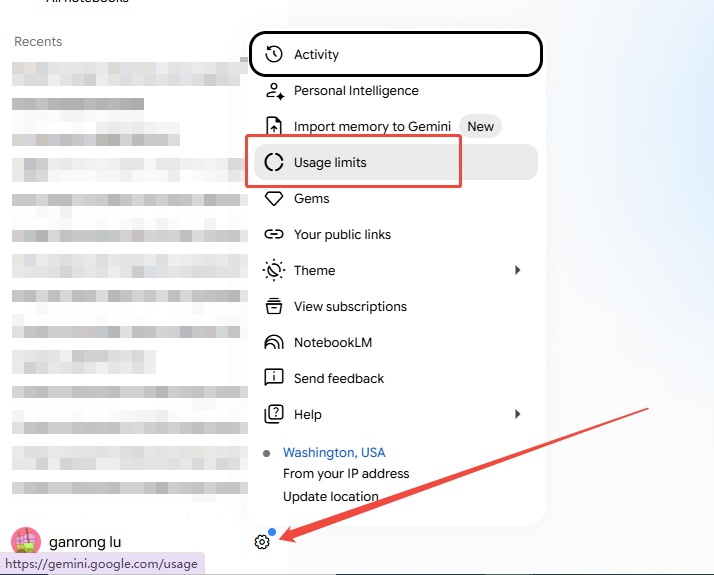
Click the gear icon (Settings) in the bottom-left corner
-
Select "Usage limits" from the menu
-
Or go directly to gemini.google.com/usage
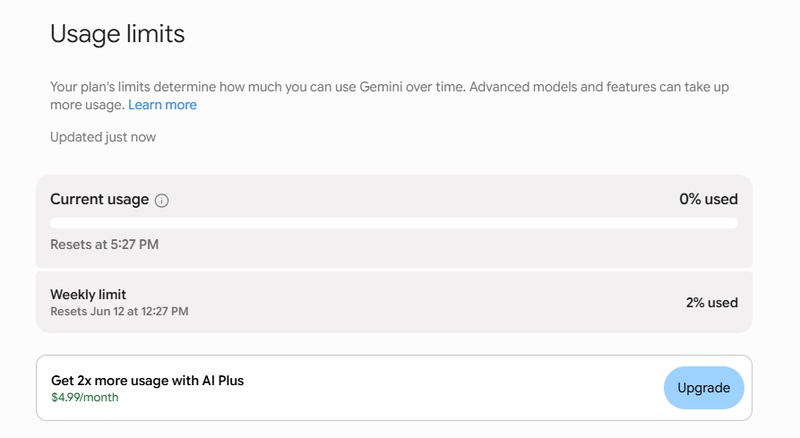


The dashboard shows your exact usage percentage in real time, a countdown timer showing when your next five-hour reset occurs, and your weekly limit tracker showing your remaining weekly allowance.

Once either meter hits 100%, Pro model access, image generation, video, and Deep Research all go offline until the next reset. Flash-Lite prompts are free and won't count against your quota, so basic text chat remains available.
Why Your Gemini Quota Runs Out So Fast
The new Gemini AI usage cap issue comes down to one core change: compute-based usage limits factor in the complexity of your prompt, the features you use, and the length of your chat. A short question costs almost nothing. A video generation request can drain a huge chunk of your 5-hour window in one shot.
Here is a breakdown of how different tasks hit your new Gemini usage limits:
Beyond task type, two settings quietly accelerate your drain:
1. Model selection
Staying on Gemini Flash is the single best habit for preserving quota. The moment you switch to the Pro model for a routine text task, your usage jumps dramatically. On a free plan, one Pro model text prompt can consume around 23% of your 5-hour window.
2. Thinking Level
When using Gemini 3.1 Pro, Google is capping the amount of quota a single prompt can use so you get more out of the Pro model. But Extended Thinking still burns significantly more compute than Standard mode. Unless you need deep reasoning, keep Thinking Level at Standard.
Plan tier comparison for new Gemini usage limits:
How to Bypass Gemini Limit?
Hitting the cap does not mean stopping work. There are several legitimate ways to get around the Gemini AI usage cap issue, and most of them involve using other Google tools that run on completely separate quota systems.
Quick reference: what to use instead of Gemini
1. Use NotebookLM for research and document tasks
This is the single most effective workaround for heavy readers and researchers. Upload your PDFs, websites, or articles to NotebookLM for summarization, Q&A, and even infographic creation. NotebookLM usage is completely independent from your Gemini quota, so it does not touch your cap at all.

2. Use Google Antigravity for coding
Google has raised rate limits in Antigravity by 3x permanently. If you are doing serious coding work, switching from Gemini's Canvas to Antigravity gives you triple the headroom without burning through your main Gemini limit.

3. Use Google Flow for music and video
Google Flow Music and Flow (forvideo/image) each run on their own credit system. Free accounts get 50 credits per day, and an 8-second video costs around 25 credits. This is far more manageable than generating video inside Gemini, where one request can eat 33% of your 5-hour window.

Google Flow offers both Nano Banana 2 and Nano Banana Pro as selectable image models, available to all Flow users for zero credits - so you can generate images there without touching your Gemini quota at all.
4. Stick to Flash model for routine tasks
Reserve the Pro model for tasks that genuinely need deep reasoning. For summarizing emails, drafting outlines, or quick Q&A, Gemini Flash delivers solid results at a fraction of the compute cost.

5. Buy pay-as-you-go AI credits
AI Pro and Ultra subscribers can purchase pay-as-you-go AI credits to bypass the limit and continue working. This option is rolling out gradually, so check your settings if you need a quick top-up.
6. Use Google AI Studio via API
For developers, the Gemini API through Google AI Studio often offers more predictable and generous free-tier limits compared to the consumer app. It operates on its own RPM and RPD quota system, separate from the Gemini App entirely.

Create Better Visuals with Diagrimo

Once you have your research and ideas in order, turning them into something people can actually understand at a glance is the next step. Diagrimo is a text-to-visual tool that does exactly that. Describe what you want in plain language and get a clean, polished visual back in seconds, no design skills required.

It works well for:
-
Content planning: map out your content calendar or campaign structure visually
-
Project timelines: turn project milestones into a clear visual overview
-
Team workflows: lay out responsibilities and handoffs so everyone stays aligned
-
Comparison layouts: present options side by side in a format that's easy to scan
Final thoughts
The Gemini AI usage cap is manageable once you know how the compute-based system works. Check your usage dashboard, use Flash for everyday tasks, and offload heavy work to NotebookLM, Antigravity, and Google Flow. Need to turn your ideas into clean visuals? Diagrimo makes that fast and easy.

- AI text-to-visuals turns ideas into diagrams or infographics.
- Customizable styles match your brand and presentation tone.
- Share anytime by exporting in various formats and a link.
- No design skills needed for presentations, teaching, or reports.
FAQs
-
Why is Gemini saying I reached my limit?
-
Is there a daily limit on Gemini AI?
-
How to bypass Gemini limit?
-
How many times can you use Gemini AI?
Gemini now tracks compute usage, not just prompt count. Heavy tasks like video generation or Deep Research can drain your 5-hour window in just a few requests.
Gemini replaced daily limits with a compute-based model featuring 5-hour refresh windows and a weekly cap after Google I/O 2026.
Use NotebookLM for documents, Google Antigravity for coding, and Google Flow for video and music. All three run on separate quotas and do not touch your Gemini cap.
There is no fixed prompt count. Usage depends on compute weight per task. Your quota refreshes every 5 hours until the weekly limit is reached.
