Bad haircuts used to be a gamble. You'd walk into a salon with a vague idea, point at a photo, and hope for the best. In 2026, that guesswork has an answer: the ChatGPT Images 2.0 hairstyle analysis prompt.
The trend is everywhere right now. Social media feeds are filled with side-by-side visuals showing flattering cuts and colors, all generated in minutes, with users uploading their portraits and getting instant, personalized style breakdowns. This guide walks you through exactly how to do it, which prompts actually work, and what to do with the results once you have them.
What Is the ChatGPT Images 2.0 Hair Analysis Trend?
OpenAI launched ChatGPT Images 2.0 on April 21, 2026, instantly sparking a styling trend across TikTok and X. This new model uses native reasoning to process visual tasks before creating images. Users immediately noticed a major upgrade from version 1.5, particularly in how perfectly the tool maps facial structures and follows strict design rules.
This technological leap completely transforms virtual hairstyle analysis. People now use targeted prompts to generate clean visual comparisons instead of reading long text explanations. The system handles these complex styling requests easily and drops realistic haircut previews directly onto your uploaded selfie.
The 2.0 update brings several crucial features to your digital styling session:
-
Proportional mapping: The AI measures your facial structure to recommend the most flattering cuts.
-
Multi-image consistency: You can view multiple style options together in a single 2K resolution graphic.
-
Photorealistic rendering: See exactly how new lengths and colors look on your own face instead of a generic stock model.
How to Use ChatGPT Images 2.0 for Hairstyle Analysis
Getting a professional-grade hair consultation from AI is simpler than most people think. You just need a clear photo and a structured chatgpt hairstyle analysis prompt to guide the model's vision.
Follow these steps to get started:
-
Step 1: Capture a clear portrait
Take a photo in natural light, ensuring your hair is pulled back to reveal your full face shape.
-
Step 2: Upload to ChatGPT
Use the Images 2.0 model for the best visual processing.
-
Step 3: Input the Master Prompt
Use the specific prompt below to trigger a detailed analysis.
 The Viral Analysis Prompt:
Create a hairstyle analysis graphic using this portrait. Analyze my face shape (oval, round, square, or heart) and suggest three hairstyles that balance my features. Show these recommendations in a side-by-side comparison format. Include a brief note on which hair colors suit my skin undertone. Keep the output visual-first with minimal text.
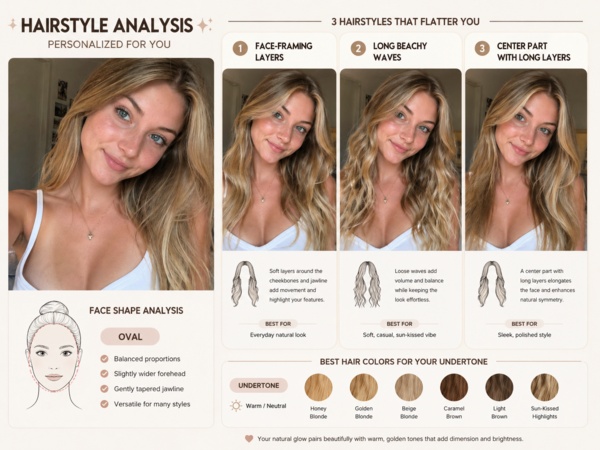

More Best ChatGPT Prompts for Hairstyle Analysis (Copy and Paste)
The prompt is everything. A vague ask gets vague output. A structured prompt gets something you can actually bring to a stylist.
The Starter Prompt (Beginner-Friendly)
This is the version that went viral and works well as a first try:
Create a hairstyle analysis graphic using this portrait. Show side-by-side hairstyle comparisons to highlight which hairstyles suit the subject best. Make it visual-first, with short labels only and no paragraphs.
This prompt was shared widely on X in late April 2026 and has driven thousands of posts with users sharing their AI-generated hairstyle comparison graphics.

The Deep Analysis Prompt
For a more personalized breakdown, use this version:
I am uploading a portrait for a professional hair consultation. Please perform a three-part analysis:
Geometry: Identify my exact face shape and prominent features, including jawline and forehead height.
Styling: Suggest three trending 2026 hairstyles that balance my proportions, such as a graduated bob, disconnected bangs, or textured layers.
Visualization: Create a side-by-side graphic showing me with each of the three styles. Keep labels concise and the tone editorial.

The Color Analysis Add-On Prompt
Once you have a style direction, add this as a follow-up:
Now take the [style name] option and suggest five hair color variations that would complement my skin tone. Choose the shades yourself based on what you see in the photo. Rate each from 1 to 10 based on compatibility and show the results in the same visual format.

The Maintenance Realist Prompt
Perfect if your schedule doesn't allow for high-maintenance styling:
For each hairstyle you suggested, add a maintenance score from 1 to 10. Rate how much daily effort, heat styling, and salon frequency each requires. Prioritize styles with scores of 7 or below.

The Hair Type Refinement Prompt
Use this when the first result feels too generic:
My hair is [fine and straight / coarse and curly / thick and frizzy]. Revise your suggestions with this in mind. Avoid styles that require more than 15 minutes of daily styling. Show updated visuals with the same side-by-side format.
Make Your Ideas Visual with Diagrimo

Whether you're mapping out a project, explaining a process, or trying to get a complex idea out of your head, Diagrimo makes it easy to turn text into clean, beautiful visuals.
Diagrimo is a text-to-visual tool built for people who want professional-looking results without any design background. You type out what you need, and Diagrimo turns it into something that actually looks good. No templates to fiddle with, no design skills required.
Here's where Diagrimo genuinely shines:
-
Personal planning: Map out multi-step goals, timelines, or decision paths in a visual format that's easy to share
-
Team communication: Turn meeting notes or project briefs into clear visual summaries everyone can follow
-
Content creation: Build visual assets for presentations, social posts, or explainer content without needing design software
-
Educational use: Break down complex topics into structured, easy-to-read visuals for any audience
Pro Tips for Precise AI Styling Results
While the basic prompt works well, you can achieve much better results by adding specific constraints. AI models sometimes default to generic styles unless you provide a "vibe" or context.
Consider these advanced adjustments:
- Define your aesthetic: Add phrases like "Old Money style," "Modern K-Pop aesthetic," or "Professional Corporate look" to the prompt.
- Specify hair texture: Tell the AI if your hair is fine, thick, curly, or straight so the recommendations remain realistic.
- Request multiple angles: Ask the AI to show how a specific cut looks from the side or back to help your stylist understand the vision.
Final thoughts
The ChatGPT Images 2.0 hairstyle analysis prompt trend is more than a social media moment. It is a practical tool for anyone who wants to walk into a salon with a clear direction and realistic expectations.
With 2026 trends favoring structured cuts and rich colors, AI helps you test new looks before the scissors come out. Use our prompts as your starting point. And if you find yourself with a lot of ideas to keep track of, Diagrimo is worth a look. When you've got a lot of ideas floating around, having something visual to look at makes the whole thing a lot more manageable.

- AI text-to-visuals turns ideas into diagrams or infographics.
- Customizable styles match your brand and presentation tone.
- Share anytime by exporting in various formats and a link.
- No design skills needed for presentations, teaching, or reports.

FAQs
-
Can ChatGPT Images 2.0 detect my hair texture from a photo?
-
Do I need a paid ChatGPT subscription to use the hairstyle analysis feature?
-
What if my stylist says the AI-suggested style won't work for my hair?
-
Which 2026 hair trends work well to request in a ChatGPT prompt?
Can I use the same prompt on Google Gemini?
Is AI reliable for major hair cuts?
It can make a reasonable visual estimate, but describing your texture directly in the prompt ("fine and straight" or "thick and coarse") gives you noticeably better suggestions.
Basic image generation is available to free-tier users, but advanced features like multi-image batching and layout reasoning require a Plus ($20/month) or Pro ($200/month) subscription.
Trust your stylist. They can assess your hair's elasticity, density, and growth patterns in ways AI cannot. Use the AI output for direction, not as a final brief.
Disconnected bangs, the graduated bob, and lavish brunette shades are all major 2026 trends worth naming directly in your prompt for more current results.
Yes. The core prompts in this guide work across both tools. ChatGPT tends to produce more detailed cinematic results, while Gemini is faster for straightforward previews. Running both and comparing is worth the extra few minutes.
Accurate enough to be a useful reference, not a guarantee. Think of it as a face-specific mood board rather than a technical specification for your stylist.
