Nano Banana Pro graphic design is rapidly transforming the creative industry by solving the biggest pain points of generative AI: illegible text, inconsistent characters, and lack of layout control. "Nano Banana Pro" (Gemini 3 Pro Image model) is not just an image generator. It is a reasoning engine that understands design principles.
Below, we explore why professionals are switching to this tool, how to access it, and 8 powerful use cases with actual prompts you can use today.
Why Designers Choose Nano Banana Pro

Unlike traditional diffusion models that "guess" pixels, Nano Banana Pro uses advanced logic to "plan" a design before rendering it. Here are the key features that make it indispensable for graphic design:
- Flawless Text Rendering
It is the first model to reliably generate legible text in images, supporting complex slogans, distinct fonts, and multiple languages without the usual "AI gibberish."
- Character & Brand Consistency
The model can memorize a specific character or mascot and keep their facial features and clothing consistent across different poses and lighting conditions.
- Studio-Grade Controls
It offers granular control over photography settings, allowing you to specify camera angles (e.g., "top-down knolling"), lighting styles (e.g., "Rembrandt lighting"), and depth of field.
- Multi-Image Fusion
You can blend up to 14 reference images simultaneously. This is critical for creating mood boards where you need to combine a specific color palette, a sketch layout, and a texture sample into one cohesive output.
- Vector-Ready Aesthetics
It excels at generating flat, clean, high-contrast designs that are easily traceable into vector formats (SVG) for professional logo and icon work.
How to Use Nano Banana Pro for Graphic Design
There are two primary ways to access the Nano Banana Pro engine, depending on whether you need a simple chat interface or professional API controls.
Method 1: Using Nano Banana Pro in Gemini
For quick ideation and edits, use the standard Gemini interface, which hosts the model.
-
Step 1. Access Gemini Advanced
Go to gemini.google.com and ensure you are subscribed to the Advanced plan (which includes the latest experimental models).
-
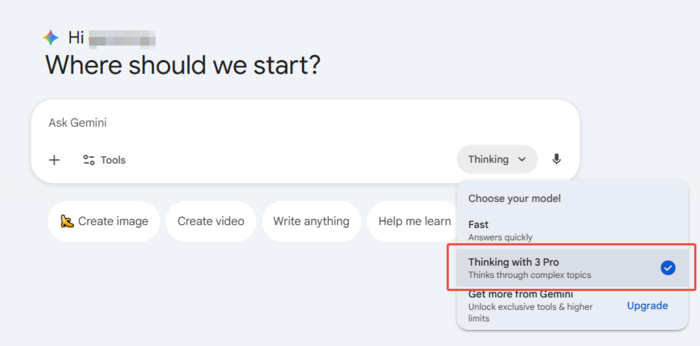
Step 2. Select the Model
Choose the "Thinking" model option if available. This is the underlying engine for Nano Banana Pro.
-
Step 3. Enable Image Generation
Simply type your prompt. To trigger the specific design capabilities, start with "Generate an image of..."
-
Step 4. Iterate
You can use conversational follow-ups like, "Change the background to blue" or "Make the text bold."
 Tip:
Tip:Free users can try the Nano Banana Pro model for free every day, typically generating up to 3 images per day. The number of free uses varies by region.
Method 2: Using Nano Banana Pro in Google AI Studio
For maximum control, higher resolution (up to 4K), and raw parameter tuning, use Google AI Studio.
-
Step 1: Log in to Google AI Studio
Visit aistudio.google.com and sign in with your Google account.
-
Step 2: Link a Paid API Key
Nano Banana Pro is a premium-tier model; you must "Link a paid API key" to unlock the interface and access higher rate limits.
-
Step 3: Select the Model
On the right-hand sidebar under "Run settings", click the model dropdown and select Nano Banana Pro.
-
Step 4: Configure Generation Settings
-
- Aspect ratio: Change from "Auto" to specific dimensions like 16:9 (Landscape) or 9:16 (Portrait), depending on your design needs.
- Resolution : Select your desired output quality (e.g., 4K).
- Tools: Toggle "Grounding with Google Search" if you want the model to fetch real-world context for your design.
-
Step 5: Input & Run
Type your prompt in the bar at the bottom. Use the "+" icon to upload reference images and click Run to generate.


Unleashing the Creative Power of Nano Banana Pro
Forging a Brand Identity: Logos and Typography
Use Case 1: Design Product Logo
Create a clean, scalable logo that doesn't look like a messy painting.

Design a minimalist vector logo for a coffee brand named 'Lunar Brew'. The icon should be a line-art combination of a crescent moon and a coffee bean. Use a color palette of navy blue and gold. White background. Flat design, no shading, suitable for SVG tracing.
Use Case 2: Generate Font Design
Create custom assets for game design or unique branding.

Generate a font design sheet for a fictional alien civilization. The symbols should look similar to Ancient Egyptian hieroglyphics but with a futuristic, cybernetic twist. Display the letters A through Z in a grid layout. Black ink on parchment paper texture. Clear, distinct lines for each glyph.
Advanced Image Synthesis: Blending Realities
Use Case 3: Combine Multiple Reference Images
Ideal for creating "Mood Boards" or complex concept art.

Put these six people into a single image; they should fit into a stunning, award-winning shot in the style of a fashion editorial. The identity of all six people and their attire must stay consistent throughout, but they can and should be seen from different angles and distances in as is most natural and suitable to the scene.
Use Case 4: Style Transfer
Keep the structure of your product but change the "vibe."

Transform the simple sketch into a realistic chair, follow creative direction of the sketch and use the colors and texture from the car image.
Precision Editing and Localization
Use Case 5: Modify, Add, and Translate Text

Add a neon sign mounted on the brick wall that says 'OPEN 24 HOURS'. The neon tubes should be bright pink. Ensure the sign casts a realistic pink glow onto the surrounding bricks and a reflection on the wet pavement below.

Translate all the English text on the three yellow and blue cans into Korean, while keeping everything else the same.
Use Case 6: Modify Details of Images
This demonstrates the engine's powerful "global editing" capability. It doesn't just apply a dark filter; it semantically re-lights the entire scene by changing shadows, color temperature, and reflections while preserving the exact subject and composition.

Turn this scene into nighttime
Visualizing Data: Infographics and Annotations
Use Case 7: Generate Infographics
Create educational content from scratch.

Generate a vertical infographic about the 'Life Cycle of a Coffee Plant'. Divide it into 4 sections: Planting, Harvesting, Roasting, and Brewing. Use a flat illustration style with earth tones. Include placeholder text blocks for each section and clear directional arrows connecting the steps.
Use Case 8: Add Descriptions to Items
This feature is invaluable for the travel and tourism industry. It allows creators to instantly turn scenic photos into informative guides by automatically recognizing famous landmarks and placing perfectly aligned labels without manual tracking.

Analyze this cityscape. Identify the 'Statue of Liberty' and the 'Empire State Building'. Add clean, white text labels with thin leader lines pointing to the torch of the Statue and the spire of the Empire State Building. Ensure the text is bold and readable against the purple evening sky, positioned to create a travel-guide aesthetic.
Final thoughts
Nano Banana Pro Graphic Design represents a shift from "prompt-and-pray" to "prompt-and-plan." By integrating deep understanding of text, spatial awareness, and reference blending, it empowers designers to use AI as a precise tool rather than a novelty toy. Whether you are localizing global assets or inventing new typographic languages, mastering Nano Banana Pro (Gemini 3) is now an essential skill for the modern creative workflow.
For creators who want to turn ideas into clear workflows and visuals faster, Diagrimo is an excellent choice for structuring concepts, mapping logic, and presenting complex information in a clean, intuitive way.

- AI text-to-visuals turns ideas into diagrams or infographics.
- Customizable styles match your brand and presentation tone.
- Share anytime by exporting in various formats and a link.
- No design skills needed for presentations, teaching, or reports.

FAQs
Is Nano Banana Pro free to use?
-
Can I use the images for commercial purposes?
-
Why is the "Hieroglyphics" font generation useful?
-
How accurate is the text translation in images?
Where can I access Nano Banana Pro?
Yes. Free users can use Nano Banana Pro in the Gemini app to generate up to 3 images per day at no cost.
Yes, Google generally allows commercial use of images generated by Gemini models, provided you adhere to their Generative AI Prohibited Use Policy. Always check the latest Terms of Service in your specific region.
It is invaluable for concept artists, game developers, and brand designers who need unique "lore-friendly" scripts or abstract branding patterns that don't exist in standard font libraries.
It is highly accurate for major languages (Spanish, French, German, Chinese, etc.). However, for professional print campaigns, we always recommend a human review to ensure cultural nuance and perfect kerning.
Through the Gemini app, Google AI Studio, and supported integrations across AI-powered creative tools.
