A spoke diagram is a simple and clear way to show how different ideas relate to one central idea. It is widely used in business, marketing, project planning and education because it turns complex information into a visual that is easy to follow. In this guide, you will learn what a spoke diagram is, the different forms it can take and how to create a spoke diagram with PowerPoint and popular tools.
What is a Spoke Diagram?
When people ask what a spoke diagram is, the answer is very straightforward. Picture the wheel of a bicycle. The center represents your main idea and the lines that reach outward represent the supporting ideas. This wheel like layout helps the viewer understand relationships at a glance. It is often used to explain product features, team structures, project elements or marketing messages.

A circle spoke diagram is simply the most common version. It places the main idea in the middle and uses a clean round shape to connect all the surrounding points.
Types of Spoke Diagram
The hub spoke diagrams can be tailored according to the application, since they can have extensive use cases. However, it has the following common types:
-
Basic Hub and Spoke: A circle in the center with lines radiating to individual ideas or nodes.
-
Semi-Circle Spoke: Used to represent limited ideas, the spokes are arranged in a half circle.
-
Connected/Flowing Spoke: Consists of interconnected lines and shapes for dynamic flow.
-
Circular Infographics: Represent complex data and concepts visually using a variety of colors, icons, and shapes within the spokes.
-
Speech Bubble Spoke: Used for communication-focused diagrams, they contain speech bubbles instead of nodes.
Applications and Examples of Spoke Diagrams
The spoke diagram has diverse applications, but it is specifically used in the following 3 areas:
- Marketing: spoke diagrams are used to present a product's features and benefits.
- Networking: To represent complex networks, such as airline routes, data flows, and IT networking setups, hub and spoke diagrams are used.
- Management: Typically used to represent the management hierarchy in companies, with the CEO as the central body and other staff as spokes.
How to Create a Spoke Diagram Easily?
If you want the simplest way to create a spoke diagram, the fastest and smartest option is Diagrimo spoke diagram generator. Instead of dragging shapes, drawing lines or adjusting layouts by hand, you can simply describe the diagram in plain text and let the tool build it for you. Diagrimo reads your description and instantly generates a clean spoke diagram that matches your idea. This removes the usual manual work and saves a lot of time.
Here is how to create a spoke diagram using Diagrimo.
- Go to Tenorshare AI Diagrimo.
- Type the text that explains your central idea and the connected points.
- Select the text and click the Visualize icon.
-
Wait a moment while Diagrimo turns your text into a complete hub and spoke diagram.

-
Choose the style you prefer and export or share the result.



Create a Hub and Spoke Diagram Manually
Creating a hub and spoke diagram is pretty straightforward. All you need to do is draw a circle in the middle, add spokes, connect them with arrows and lines, and finally label them. But you can simplify it with tools. In this section, we will demonstrate creating a spoke diagram in PowerPoint, Canva, and Diagrimo.
Create a Hub and Spoke Diagram in PowerPoint
PowerPoint is one of the most popular tools used to create visual presentations. It allows you to add different charts and diagrams in its SmartArt feature. The following steps show how to create a hub and spoke diagram in PowerPoint:
-
Launch PowerPoint.
-
Create a presentation using a template or a blank presentation.
-
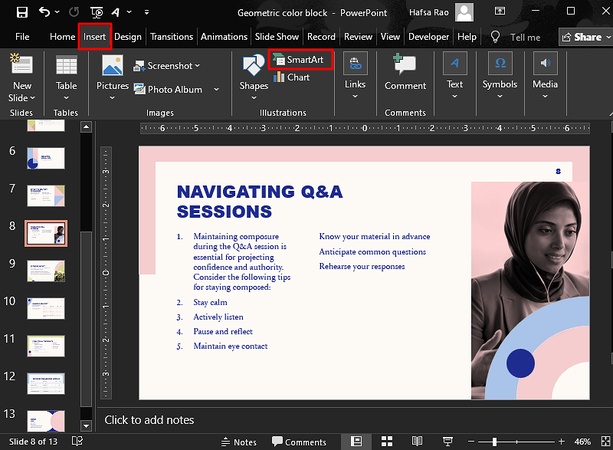
Go to the Insert tab and select SmartArt.
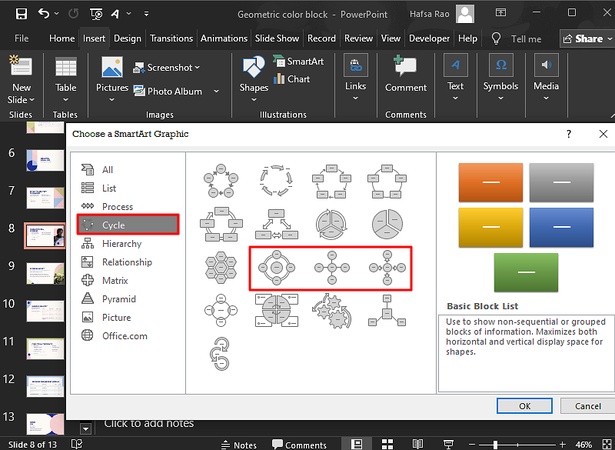
Switch to the Cycle tab.
-
Select the desired cycle hierarchy and make any necessary changes.
-
You can add or remove the spokes or arrows by right-clicking on the diagram.


Make a Hub and Spoke Diagram in Canva
In Canva, you can create presentation designs, logos, book covers, thumbnails, and almost anything related to design. So, you can also use it to create Hub and Spoke diagrams as follows:
-
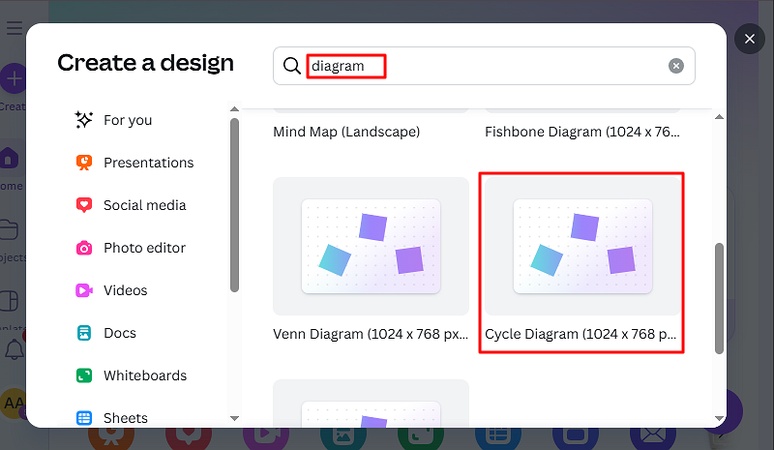
Go to Canva and click on Create.

-
Search Diagram in the search box and select Cycle.
-
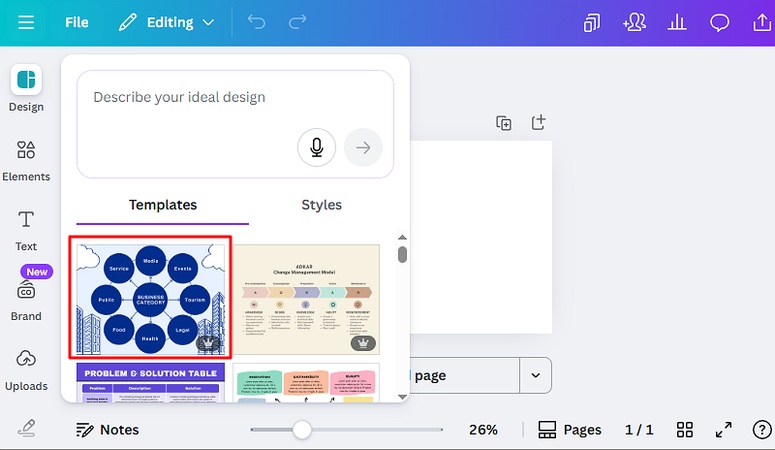
Under Templates, select your desired design and make changes.


Conclusion
A spoke diagram is a clear way to organize ideas around a central point and is widely used in business and communication. It helps present information in a simple structure that anyone can understand. If you want the easiest way to create a hub spoke diagram, the text to diagram tool offers a smart and effortless option that turns your ideas into visuals with very little work.

- AI text-to-visuals turns ideas into diagrams or infographics.
- Customizable styles match your brand and presentation tone.
- Share anytime by exporting in various formats and a link.
- No design skills needed for presentations, teaching, or reports.

FAQs
What does a Spoke diagram look like?
Can ChatGPT create network diagrams?
-
What tools can be used to create hub and spoke diagrams?
What are the use cases of a Spoke diagram?
A spoke diagram looks like a wheel with a central circle surrounded by nodes. Each node is connected to the central entity with spokes.
ChatGPT can create network diagrams by generating code; i.e., it cannot generate them in visual form, but you can implement the generated code to view the image.
You can create a hub spoke diagram in any drawing tool, including but not limited to MS Paint, Figma, Canva, PowerPoint, Word, etc.
The spoke diagrams are commonly used to demonstrate relationships among entities, illustrate ideas, simplify complex topics, show hierarchies, and visualize product features.
