The wait is over! We are thrilled to introduce the highly anticipated Comments feature to Diagrimo. Now, you can easily exchange thoughts, gather feedback, and interact with others directly within your documents.
Here is a quick look at what's new:
1. Easy Text & Paragraph Comments
We've made leaving comments incredibly intuitive, ensuring it never breaks your reading flow:
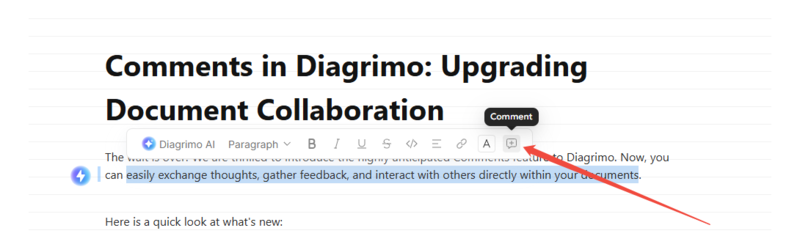
Highlight to Comment: Simply select any text you want to discuss, click the "Comment" icon on the floating toolbar, and leave your precise thoughts.
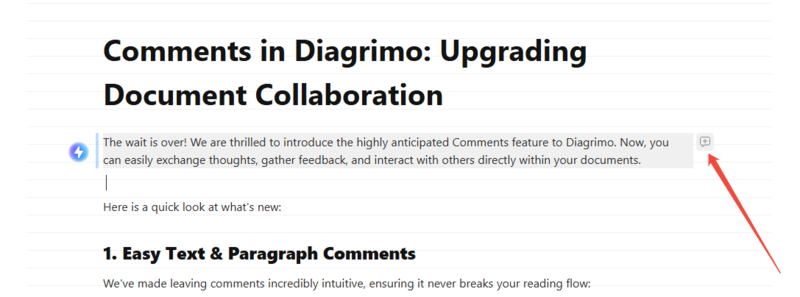
Paragraph Comments: Hover over any paragraph and click the "Comment" icon that appears on the right side to drop a quick note on the entire block.
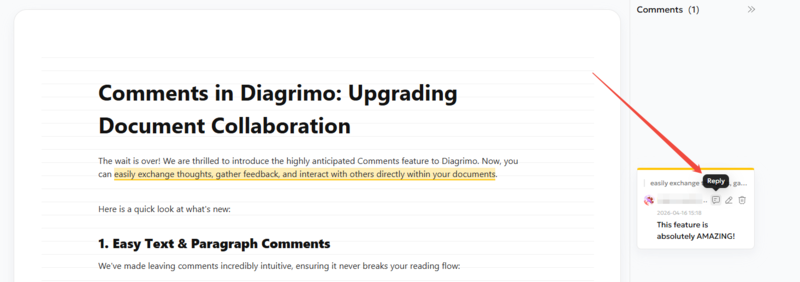
Reply to Comments: Want to continue the discussion? Just click the "Reply" icon on any comment card in the right sidebar to leave your response.


2. Upgraded Sharing: "can view & comment" Access
We've expanded your sharing capabilities. In the top-right Share panel, you'll now find the new "can view & comment" permission. This allows you to easily share documents with others, inviting them to leave their annotations and feedback directly on the page.

3. Comment & Reply Notifications
Keep track of all feedback with ease. Click the notification bell to open your message center, where you can now filter messages specifically by "Comments" or "Replies". This allows you to quickly see who left a new note or responded to your discussion, and jump directly to the relevant document to review it.

Great collaboration starts with a simple comment. Head over to Diagrimo, start exploring the new feature today!
