Let's be honest, most presentations lose people within the first few minutes. Slides feel crowded, speakers read from the screen, and the audience starts checking their phones. The good news? It doesn't take fancy tricks or design skills to fix this.
If you've ever wondered how to make a presentation interesting, fun to follow, and easy to understand, this guide breaks it down into simple, practical steps. Whether you're giving a short talk, a team update, or a full PowerPoint presentation, these ideas will help you keep attention and get your message across clearly.
What Makes a Good PowerPoint Presentation?
Before jumping into tips, it helps to understand what actually makes a presentation work. A good PowerPoint presentation isn't about flashy animations, it's about clarity and connection.

A strong presentation usually includes:
- A clear message
Every slide should support one main idea. If it doesn't, it probably doesn't belong.
- Simple, readable slides
Fewer words. Bigger text. Clean visuals.
- Logical flow
Ideas should move naturally from one point to the next.
- Visual support
Diagrams, charts, and visuals should explain ideas faster than words.
- Audience focus
The content should answer one question: "Why does this matter to them?"
When these basics are in place, it becomes much easier to figure out how to make a boring presentation interesting.
5 Tips and Ways to Make Your Presentation Interesting
This is where most people struggle. Below are practical, proven ways to make your presentation more engaging without overcomplicating things.
1. Start With What Your Audience Cares About
People pay attention when they feel seen. Open your presentation by addressing a real problem, question, or situation your audience relates to. This is one of the simplest ways to make a presentation feel relevant right away.
2. Keep Slides Visually Clean
Crowded slides kill attention. Instead of manually struggling to formatting text or reducing word counts, the most effective solution is to use Diagrimo. This tool automatically transforms dense information into clear, structured visuals, ensuring your slides remain clutter-free. By relying on Diagrimo to handle the visual layout, you instantly solve the problem of how to make a PowerPoint presentation more interesting without the hassle of manual design.

3. Use Short Stories Instead of Long Explanations
Facts inform, but stories stick. Even a quick real-life example can make your message easier to remember. This works especially well for how to make a short presentation interesting or how to make a 10 minute presentation interesting, where every minute counts.
4. Break the Pattern
If you talk nonstop, people drift. Mix things up:
-
Ask a quick question
-
Pause and let people think
-
Invite a short response
This is especially helpful if you're learning how to make a presentation interesting without PowerPoint or trying to keep energy high during longer sessions.
5. Focus on Delivery, Not Just Slides
Your slides should support you, not replace you. Speak naturally. Look at your audience. Treat the presentation like a conversation, not a script. This small shift makes a big difference, especially for beginners.
How to Use Diagrimo to Make a Presentation Interesting

One of the biggest reasons presentations fail is unclear visuals. This is where Diagrimo fits in naturally.
Diagrimo helps turn plain text into clear, structured diagrams that are easy to understand at a glance, perfect for presentations.
Here's how you can use Diagrimo to improve your PowerPoint slides:
-
Step 1: Turn Text Into Visuals
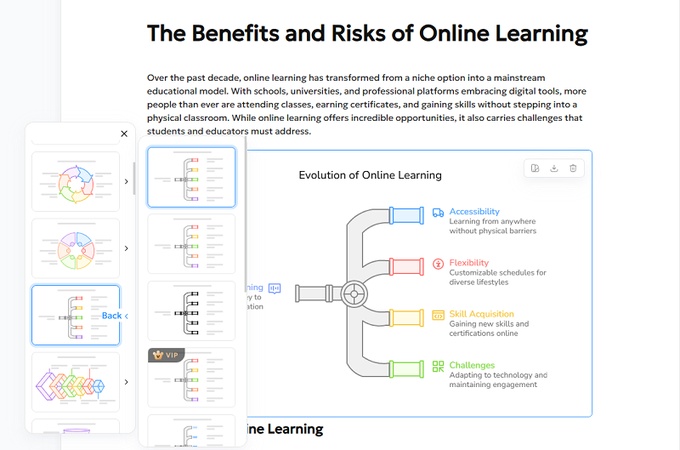
Instead of explaining complex ideas with long bullet points, paste your text into Diagrimo. It instantly converts it into diagrams, flowcharts, or structured visuals.
-
Step 2: Customize for Your Presentation Style
Diagrimo lets you adjust colors, layout, shapes, and fonts. This helps keep your presentation visually consistent without needing design skills.
-
Step 3: Insert Diagrimo Images Into PowerPoint
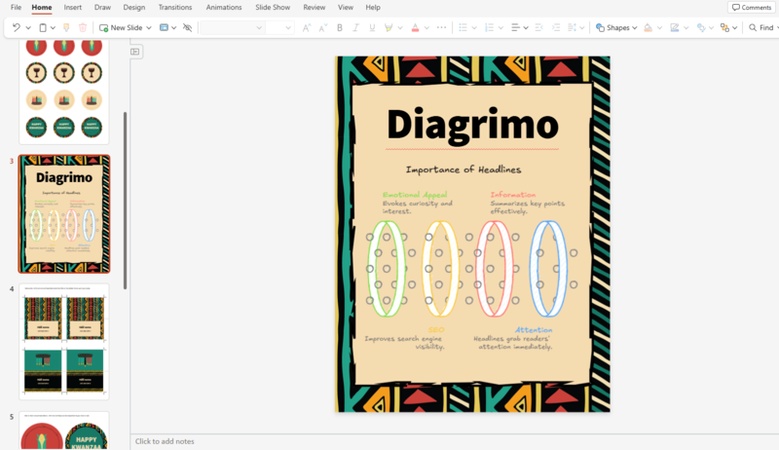
Once your diagram is ready, download the image and insert it directly into your PowerPoint slide to replace text-heavy sections. Crucially, use this visual to guide your talk rather than reading from a script. This keeps your audience focused on you while the diagram helps them understand complex ideas quickly.


Elevate Your Presentation Strategy
Once the basics are covered, small improvements can elevate your presentation even more:
-
Keep slides consistent in style
-
Avoid unnecessary animations
-
Leave white space, it helps readability
-
End with a clear takeaway
These presentation improvement tips help your audience remember what mattered most.
Final Thoughts
Making a presentation interesting isn't about flashy slides or complicated designs. It's about clarity, connection, and using visuals that actually help your audience understand.
Diagrimo makes this process easier by turning ideas into clean, structured visuals you can drop straight into PowerPoint. Whether you're working on a short presentation or a detailed deck, using clear diagrams helps your message land faster and stick longer.
If your goal is to keep attention, explain ideas clearly, and create presentations people actually remember, combining smart structure with tools like Diagrimo is a strong place to start.

- AI text-to-visuals turns ideas into diagrams or infographics.
- Customizable styles match your brand and presentation tone.
- Share anytime by exporting in various formats and a link.
- No design skills needed for presentations, teaching, or reports.

FAQs
-
How do I make a boring presentation interesting?
-
How can I make a PowerPoint presentation more interesting?
-
How do I make a short presentation interesting?
-
What makes a 10-minute presentation engaging?
-
Do visuals really help make presentations more engaging?
Focus on your audience, simplify your slides, tell short stories, and use visuals that explain ideas clearly.
Use fewer words, more visuals, and tools like Diagrimo to turn text into diagrams.
Stick to one main idea, support it with visuals, and keep the pace moving.
Clear structure, good timing, simple visuals, and interaction.
Yes. Visuals help people understand faster. Diagrimo makes creating those visuals simple and effective.
