Whimsical AI is gaining popularity among users who want to quickly create charts and mind maps while minimizing manual work. Simple text can be converted into flow charts, diagrams, and visual mind maps in minutes. Ideal for teams, students, marketers, designers and project managers who need a clear explanation of ideas planning and processes. In this article, we will explain the definition, mechanism, main functions, pricing plans, and users of Whimsical AI. Step-by-step instructions on how to create a flowchart and offer a free alternative.
What Is Whimsical AI?
Whimsical AI is a visual planning and brainstorming tool that converts ideas into clear diagrams. Integrate mind maps, whiteboards and flowcharts in one place. Utilizing artificial intelligence, we propose ideas, relationships and structures based on the topics and keywords entered. This makes it easier to plan processes, organize thoughts, and explain ideas visually. It is useful for individuals and teams who want to plan their work in a simple and visual way because they can create diagrams quickly without design skills.

Key Features
Whimsical AI provides multiple useful features to support idea planning and teamwork.
-
AI-powered mind mapping: You can create mind maps by simply entering a topic. AI proposes related ideas and helps extend thinking.
-
Flowcharts and diagrams: Simple drag-and-drop tools to design workflows, user flows, and process diagrams.
-
Real-time collaboration: Teams can work simultaneously on the same board, even from different locations.
-
Templates and ready-made elements: Templates for wireframes, flowcharts and diagrams are available to save time.
-
Export options: Completed work can be downloaded as PNG, JPG, PDF file and can be shared easily.
Who Can Benefit From Whimsical AI?
Many users use Whimsical AI tools in their daily work. Product managers use Whimsical AI flowchart from text to explain user flows. Designers plan layout and logic in diagrams. Developers create system process diagrams from text. Marketers design campaigns with mind maps. Students use Whimsical AI generate flowchart from text for study notes. The reason the remote team prefers this tool is because it supports co-editing. Anyone who needs clear visuals will benefit from Whimsical AI flow charting tools.
Pros and Cons
- Easy to use, even for beginners
- Clean and clear visuals
- Fast AI diagram creation from text
- Strong collaboration tools for teams
- Helpful for planning, learning, and teamwork
- Limited control over diagram layout
- Advanced features need a paid plan
- Less flexible than manual diagram tools
- Custom design options are limited
- Not ideal for users who want full control
The ability to generate flowcharts from Whimsical AI text works well, but some users are looking for more design control.
Pricing
Whimsical AI offers flexible pricing options based on user needs.
-
Free version: Limited access to basic features and suitable for light use.
-
Pro plan: $10 per month/user. Boards and functions are increased.
-
Org plan: $20 per month/user. Enhanced management capabilities for large teams.
Please check the official website for the latest information as prices are subject to change. Many users start with the free version and upgrade when the feature is needed.
How To Use Whimsical AI for Flowchart
Whimsical AI text to diagram allows you to quickly create mind maps with the help of AI. Start with the simple steps below.
-
Step 1: Create a New Board in Whimsical AI
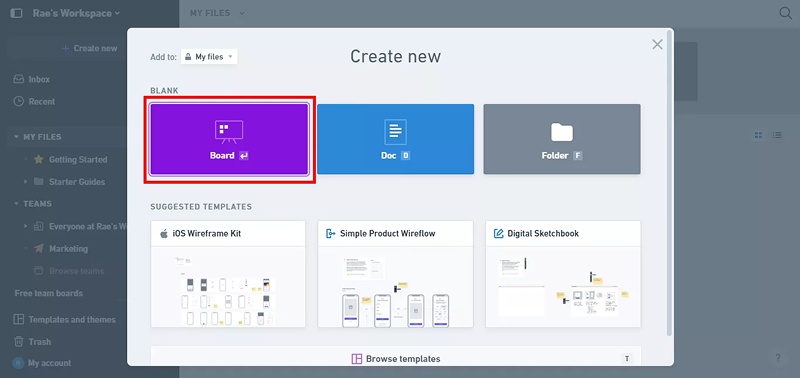
Open the Whimsical website and sign in to your account. After logging in, click the "Create New" button. From the popup menu, select "Board". This will open a blank workspace where you can start using the Whimsical AI flowchart maker to build diagrams from text.
-
Step 2: Use AI to Generate a Flowchart from Text
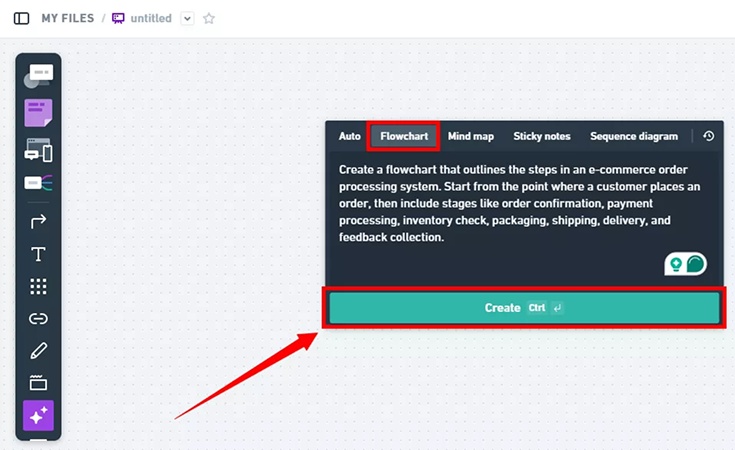
From the left toolbar, click "Generate with AI." A popup will appear. Select "Flowchart" and type your instructions clearly in the text box. The whimsical ai generate flowchart from text feature reads your input and prepares the diagram. Click "Create" to continue.
-
Step 3: Edit and Adjust the Flowchart
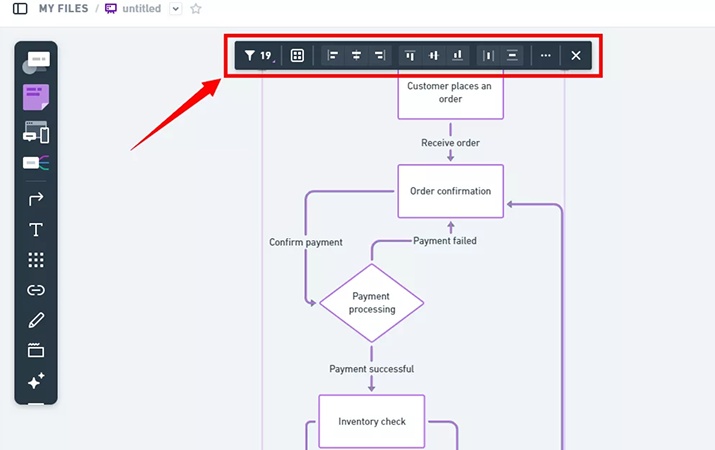
Wait a few seconds while the Whimsical AI flowchart from text system creates your diagram. Once it appears, use the top toolbar to move nodes, adjust spacing, and improve alignment. This step helps you refine the layout for better clarity.
-
Step 4: Export or Share the Flowchart
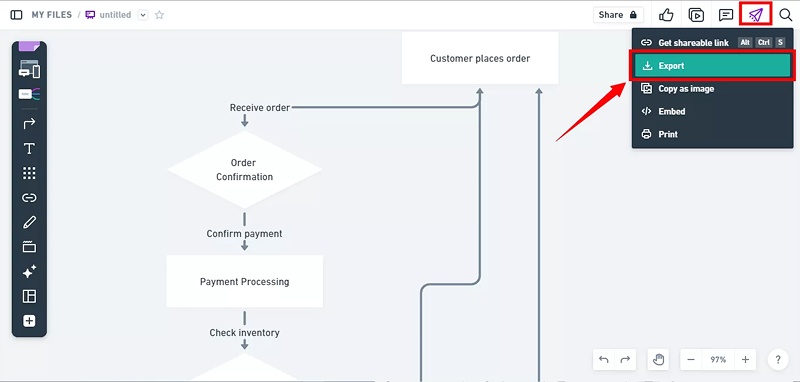
Click the "Share" icon at the top right corner of the board. Choose "Export" to download the flowchart to your device. You can also share the board with others for review or teamwork.


Free Alternatives to Whimsical
Some search for alternative tools for finer control and lower costs, while others seek better AI automation for charts and flowcharts.
Tenorshare AI Diagrimo

Tenorshare AI Diagrimo is a modern AI diagram tool designed for users who want more control and better structure. Many people choose it as an alternative to Whimsical AI because it focuses strongly on AI layout accuracy. The tool allows users to turn text into clean diagrams without manual effort. If you often use Whimsical AI generate flowchart from text but feel limited by layout options, Diagrimo can be a better choice. The interface stays simple, so beginners can also use it easily. Compared to Whimsical AI flowchart generate from text, Diagrimo offers more flexibility while still saving time.


- Automatic text-to-figure conversion with AI
- Smart layout for complex flows
- Easy editing and sophisticated visuals
- Superior control over Whimsical AI tools
Draw.io
Draw.io is a free diagram creation tool for users seeking complete manual control. Unlike the flow chart generation function from Whimsical AI text, AI is not used. The user designs all shapes and connections himself. This is useful for those who prefer custom layouts rather than automatic generation. Works on the browser and supports offline use. There is no geometry generation function from text like Whimsical AI, but it provides complete freedom to design. Suitable for technical users and detailed system diagrams.

- Complete manual layout control
- Both online and offline support
- Suitable for detailed flowcharts
Miro
Miro is a collaborative whiteboard tool primarily for teams. Allows users to jointly create flowcharts, diagrams, and planning boards. Unlike Whimsical AI flowchart from text, Miro focuses less on AI and more on teamwork. Teams can be used in conferences, planning sessions and remote workshops. Users who already use collaborative tools tend to prefer Miro over the Whimsical AI mind maps. Miro is more suitable for shared brainstorming than for high-speed AI-based diagrams.

- Powerful real-time collaboration capabilities
- Ready-made chart templates
- Useful for team planning
- Ideal for shared boards
Conclusion
Whimsical AI is a support tool for creating flow charts, diagrams, and mind maps from text. Effective for planning, education and teamwork. Features like Whimsical AI flowchart from text and Whimsical AI mind maps save time and effort. However, users who value layout control or those who want to reduce costs may choose other tools. Tenorshare AI Diagrimo is a powerful alternative with excellent AI layout options. Whimsical AI flowchart maker is a solid choice if you want to quickly visualize from text. If you need more control, try an alternative tool.

- AI text-to-visuals turns ideas into diagrams or infographics.
- Customizable styles match your brand and presentation tone.
- Share anytime by exporting in various formats and a link.
- No design skills needed for presentations, teaching, or reports.

