Many people now ask one common question: can ChatGPT make a PowerPoint ? The short answer is yes but with some limits. ChatGPT helps you plan slides, write text, and organize ideas. It does not directly design or export PowerPoint files, but you can still use it to build strong presentations. In this guide, you will learn how to use ChatGPT to make a PowerPoint presentation step by step. You will also learn tips to improve slide quality and tools that help turn text into visual slides.
Can ChatGPT Make a PowerPoint?
Many users ask, can ChatGPT make a PowerPoint for me or can ChatGPT create a PowerPoint presentation without extra tools. ChatGPT works as a content helper, not a design tool.

What ChatGPT Can Do
ChatGPT supports the planning and writing side of presentations. You can use it to:
-
Create slide outlines
-
Write slide titles and bullet points
-
Explain topics in short points
-
Suggest examples, facts, and summaries
-
Rewrite content in clear slide-friendly text
This means can ChatGPT make a PowerPoint slide in text form. It gives you ready-to-use slide content.
What ChatGPT Cannot Do
ChatGPT does not directly create PPT or PPTX files. It also cannot:
-
Design slide layouts
-
Add images directly
-
Apply animations or themes
-
Export files into PowerPoint format
So if you ask can ChatGPT make a PowerPoint file, the answer is no at least not by itself.
Useful Workarounds
Even with limits, can you use ChatGPT to make a PowerPoint successfully. You simply copy the text into PowerPoint, Google Slides, or another slide tool. Many users follow this method and save hours of work.
Step-by-Step Guide to Make a PowerPoint Using ChatGPT
If you want to know how to use ChatGPT to make a PowerPoint presentation, follow these clear steps.
-
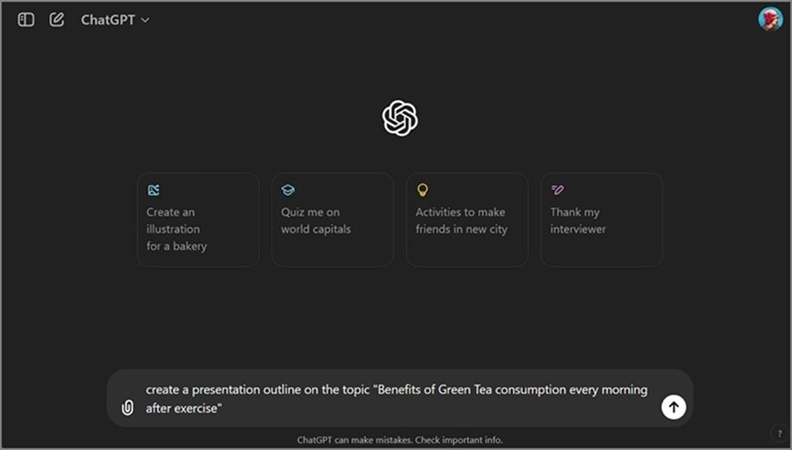
Step 1: Create a Presentation Outline
Open ChatGPT on the web and provide a prompt with your presentation topics. Answer any follow-up questions the tool asks and review the generated outline carefully. Make sure it covers all key points for your slides.
 Tip:
Tip:Include clear instructions like "create a 10-slide presentation on [topic]" to get better results.
-
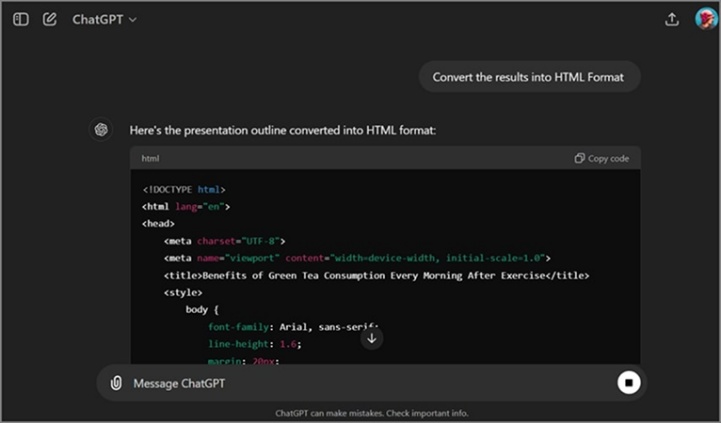
Step 2: Convert Outline into HTML Code
Once the outline is ready, ask ChatGPT to convert it into HTML format. Copy the generated HTML code and use a third-party web tool or editor to run it. This prepares the content for PowerPoint conversion.
-
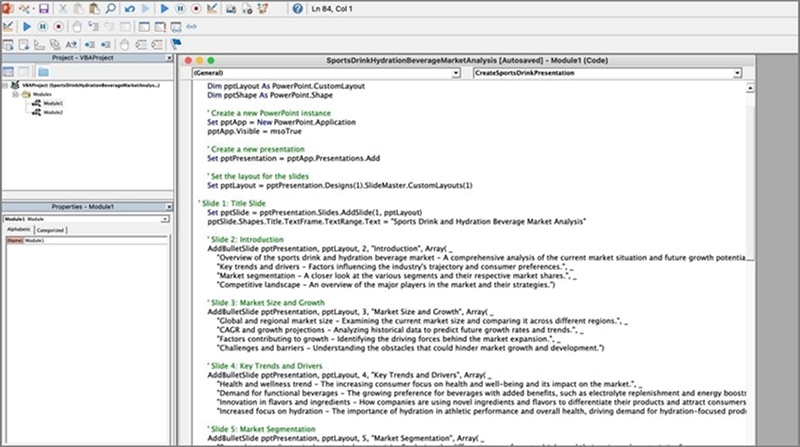
Step 3: Generate PowerPoint from HTML
Use a third-party tool, such as Visual Basic, to automatically convert the HTML code into a PowerPoint presentation. After conversion, open the file in PowerPoint and format slides with your preferred design, templates, and visuals.
Prompt Tips for Better Slides
-
Ask for short bullet points
-
Mention slide count
-
Request simple language
-
Ask for examples
These tips improve results when people ask can ChatGPT create a PowerPoint presentation using AI.
-


How to Make PowerPoint from Word Documents Using ChatGPT
Many users already have content in Word files. They ask can ChatGPT make ppt from word document easily.

Simple Process
-
Step 1. Copy your Word text
-
Step 2. Paste it into ChatGPT
-
Step 3. Ask ChatGPT to split it into slides
-
Step 4. Request bullet points for each slide
-
Step 5. Copy the output into PowerPoint
This method works well for reports, notes, and essays. It clearly proves can ChatGPT make a PowerPoint for me when content already exists. ChatGPT helps shorten text and remove extra lines. This makes slides clearer and easier to read.
Tips to Make PowerPoint Better Using ChatGPT
If you already have slides, ChatGPT can still help. Many users ask can ChatGPT make a PowerPoint better after creating basic slides.
-
Improve Text Quality : Paste slide text into ChatGPT and ask for clearer points. This improves flow and removes errors.
-
Create Image and Icon Ideas : While can ChatGPT make a PowerPoint with images directly is not possible, ChatGPT suggests image ideas. You can then search and add them manually.
-
Build a Simple Template Plan: Ask ChatGPT to suggest font sizes, color use, and layout ideas. This helps users wondering can ChatGPT make a PowerPoint template conceptually.
-
Keep Slides Consistent: ChatGPT helps keep tone and wording the same across slides. This helps answer can ChatGPT make a PowerPoint slide set that feels connected.
Turn ChatGPT Ideas into Professional Slides

Text alone does not always look professional, especially in presentations. That is where Tenorshare AI Diagrimo becomes useful. Tenorshare AI Diagrimo is an AI tool that helps you create clear diagrams, charts, and visual layouts for slides. It works very well with ChatGPT-generated content.
After ChatGPT prepares your slide text, you can use Diagrimo to turn those ideas into visual elements. This makes your slides easier to understand and more engaging for viewers. It also saves time because you do not need design skills. With Diagrimo, your presentations look organized, clean, and ready to share.

Key Features
Conclusion
So, can ChatGPT make a PowerPoint? Yes, it can create slide text, outlines, and ideas. It cannot design or export files on its own, but it still saves a lot of time. You now know how to use ChatGPT to make a PowerPoint presentation step by step. You also learned can ChatGPT create a PowerPoint presentation from scratch or from Word documents. To improve slide design and visuals, pair ChatGPT with tools like Tenorshare AI Diagrimo. Visit Tenorshare AI Diagrimo today and turn your ChatGPT slide ideas into clear, visual, and professional presentations.
FAQs
-
Can ChatGPT make a complete PowerPoint file for me?
-
Can ChatGPT add images to slides automatically?
-
Is ChatGPT free for generating presentation content?
-
Can ChatGPT convert Word documents into slides?
-
How do I make my ChatGPT slides look better?
No. Can ChatGPT make a PowerPoint file directly? Not yet. You need PowerPoint or slide tools for export.
No. Can ChatGPT make a PowerPoint with images automatically? It only suggests images.
Yes. Many users ask can ChatGPT make me a PowerPoint for free. Basic content generation is free.
Yes. Can ChatGPT make ppt from word document content? It does this very well.
Use templates, images, and tools like Diagrimo. These answers can ChatGPT make a PowerPoint better when combined with visuals.

- AI text-to-visuals turns ideas into diagrams or infographics.
- Customizable styles match your brand and presentation tone.
- Share anytime by exporting in various formats and a link.
- No design skills needed for presentations, teaching, or reports.

