NotebookLM has shipped more features in the past 12 months than most AI tools do in three years. If you've lost track of what it can do now and where it's headed, this guide breaks it all down. We've mapped every major update into a clear feature roadmap, so you can see the full picture at a glance.
How NotebookLM Has Evolved Since 2023
NotebookLM started in 2023 as "Project Tailwind," a simple document Q&A tool. By early 2026, it had evolved into a full-scale AI research and content production platform used by millions worldwide.
Here is a quick roadmap of its remarkable journey:
-
2023: Launched at Google I/O as "Project Tailwind" (featuring source uploads, grounded Q&A, and inline citations) before officially rebranding to NotebookLM in July.
-
2024: Global rollout. Late 2024 saw the viral launch of Audio Overviews (interactive AI podcasts) and the announcement of NotebookLM Plus featuring a new 3-panel UI.
-
Sep 2025: Evolved into a personalized AI tutor with new Flashcards, Quizzes, and Learning Guides. Audio Overviews gained custom formats (Brief, Debate, Critique) and tone/length controls.
-
Oct 2025: Visual capabilities introduced. Video Overviews launched with Google's Nano Banana model (custom visual styles). The 1-million token context window and Chat Personas were enabled.
-
Nov 2025: Added Infographic & Slide Deck generation. File support expanded to CSVs and images (OCR), alongside a new mobile camera capture feature.
-
Dec 2025: Upgraded to the Gemini 3 model. Introduced Data Tables, permanent chat history, and deep integration allowing users to import Notebooks directly into the main Gemini app.
-
Feb 2026: Chat engine overhauled with Gemini 3.1 Pro, delivering a 50% jump in response quality and 6x greater multi-turn conversation memory.
-
Mar 2026: Cinematic Video Overviews launched. Powered by a trio of Gemini 3, Nano Banana Pro, and Veo 3, this feature instantly turns dry PDFs into fully animated, documentary-style videos.
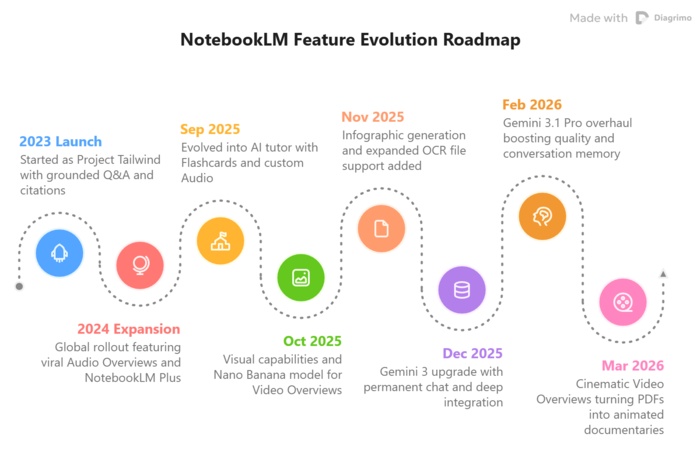


The roadmap above was turned into a roadmap diagram using Diagrimo. Paste any text-based roadmap and it generates a clean visual in seconds.
Current Features Breakdown (Studio Panel Focus)
The introduction of the 3-panel UI (Sources / Chat / Studio) completely transformed NotebookLM from a simple chat interface into a multi-modal content generation hub. The Studio Panel is where the magic happens, allowing you to convert your source documents into various ready-to-use formats.
Here is a quick breakdown of its core capabilities:
NotebookLM is unmatched for synthesizing text and data, but it doesn't generate customizable visual graphics. To bring your insights to life, simply paste your NotebookLM summaries into Diagrimo. It instantly transforms plain text into stunning, high-quality visuals-and gives you full editing control to easily tweak the layout, colors, and design exactly how you want it!
Meet Diagrimo: Your AI Text-to-Visual Tool

Most people can read a feature list. Almost nobody remembers it. Visuals change that.
Diagrimo is an AI-powered text-to-visual tool by Tenorshare AI. Paste in any text and it automatically picks the right format: roadmap, timeline, infographic, SWOT, fishbone, and more, then generates it in seconds.

Here's how people are using it:
-
Product and project teams turn update logs and meeting notes into shareable roadmaps without touching Figma
-
Educators and students convert study notes and research papers into structured diagrams that are easier to retain and present
-
Content creators build infographics from long-form articles in minutes, not hours
-
Developers and ops teams generate process diagrams that are easy to understand, straight from plain-text documentation
Diagrimo also includes an AI writing assistant for refining, rewriting, and translating content across languages.
What's Next for NotebookLM?
Google hasn't published a formal public roadmap, but based on recent release patterns and confirmed developments, here's what's likely coming:
-
Notebook search and pinning: Already spotted in development; lets users quickly locate and surface important notebooks without scrolling
-
Broader Cinematic Video access: Currently limited to Google AI Ultra ($250/month); expect rollout to Pro and eventually free tier based on past patterns
-
British English narration: Confirmed by Google via easter egg; signals wider voice personalization options ahead
-
Lecture format Audio Overview: A single-host, structured monologue mode designed for longer, more formal deep-dives
-
Deeper Google Classroom integration: Flashcards, Quizzes, and notebook sharing already work in Classroom; tighter assignment workflows are a natural next step
-
Expanded agentic research: Deep Research is currently Plus-only; wider availability is expected as the model matures
The product has shipped a meaningful update almost every month since mid-2024. If that pace holds, the feature set by end of 2026 will look very different from today.
Final thoughts
NotebookLM has gone from a simple document Q&A tool to a full content production platform in just two years, and it shows no signs of slowing down. With Cinematic Video Overviews now live and deeper Gemini integration on the way, the gap between "research assistant" and "creative studio" is closing fast.
If you work with a lot of information and need to communicate it clearly, Diagrimo is worth keeping in your toolkit.

- AI text-to-visuals turns ideas into diagrams or infographics.
- Customizable styles match your brand and presentation tone.
- Share anytime by exporting in various formats and a link.
- No design skills needed for presentations, teaching, or reports.

FAQs
Is NotebookLM free?
What model powers NotebookLM?
Can NotebookLM search the web?
What file types can I upload?
What is Diagrimo?
Yes. Core features including Audio Overviews, Mind Maps, Flashcards, Quiz, and Chat are free. NotebookLM Plus (via Google One AI Premium) adds higher usage limits and collaborative notebooks. Cinematic Video Overviews currently require the Google AI Ultra plan ($250/month).
As of early 2026, NotebookLM runs on Gemini 3, with specialized features using Nano Banana Pro (image generation) and Veo 3 (video generation) for Cinematic Video Overviews.
Yes. The Deep Research feature (currently in Plus) lets NotebookLM autonomously search the web, build a bibliography, and compile a cited report. Fast Research is also available for quicker source discovery.
PDFs, Google Docs, Google Slides, URLs, YouTube videos, audio files, images (with OCR), CSV files, and plain text. The free tier supports up to 50 sources per notebook.
Diagrimo is a text-to-diagram tool. You describe a process, timeline, or roadmap in plain text, and it generates a structured visual. It's useful for turning complex information like a product feature roadmap into shareable diagrams without design tools.
